DIY Handy Tips: Product UX Case Study

Industry
Education
Client
General Assembly
DIY Handy Tips
DIY Handy Tips
DIY Handy Tips is an app that helps people gain more knowledge using tutorials to help save money and time with their DIY projects. People need to understand how, why and where to gain tools to achieve their goal and be encouraged for future projects.
DIY Handy Tips is an app that helps people gain more knowledge using tutorials to help save money and time with their DIY projects. People need to understand how, why and where to gain tools to achieve their goal and be encouraged for future projects.
Project Overview
Challenge
This is a UX project I conceptualised during my UX course, where I aimed to create an app that would inspire users to take on DIY home improvement projects. My goal was to design an interactive, user-centred platform that would not only provide step-by-step project tutorials but also simplify the shopping experience by allowing users to sync their shopping lists with their local hardware store. This would bridge the gap between education (DIY tutorials) and convenience (easy product purchase and store navigation).
DIY projects often seem intimidating to beginners, and shopping for the right materials can be overwhelming, especially when users have to browse through endless aisles. My challenge was to create an app that would:
Encourage users to take on DIY projects by offering easy-to-follow tutorials.
Simplify the shopping experience by integrating with the hardware company’s product database.
Allow users to sync shopping lists and easily locate items in-store.
Provide an engaging and intuitive experience that would keep users motivated to complete projects.
Challenge
This is a UX project I conceptualised during my UX course, where I aimed to create an app that would inspire users to take on DIY home improvement projects. My goal was to design an interactive, user-centred platform that would not only provide step-by-step project tutorials but also simplify the shopping experience by allowing users to sync their shopping lists with their local hardware store. This would bridge the gap between education (DIY tutorials) and convenience (easy product purchase and store navigation).
DIY projects often seem intimidating to beginners, and shopping for the right materials can be overwhelming, especially when users have to browse through endless aisles. My challenge was to create an app that would:
Encourage users to take on DIY projects by offering easy-to-follow tutorials.
Simplify the shopping experience by integrating with the hardware company’s product database.
Allow users to sync shopping lists and easily locate items in-store.
Provide an engaging and intuitive experience that would keep users motivated to complete projects.
Challenge
This is a UX project I conceptualised during my UX course, where I aimed to create an app that would inspire users to take on DIY home improvement projects. My goal was to design an interactive, user-centred platform that would not only provide step-by-step project tutorials but also simplify the shopping experience by allowing users to sync their shopping lists with their local hardware store. This would bridge the gap between education (DIY tutorials) and convenience (easy product purchase and store navigation).
DIY projects often seem intimidating to beginners, and shopping for the right materials can be overwhelming, especially when users have to browse through endless aisles. My challenge was to create an app that would:
Encourage users to take on DIY projects by offering easy-to-follow tutorials.
Simplify the shopping experience by integrating with the hardware company’s product database.
Allow users to sync shopping lists and easily locate items in-store.
Provide an engaging and intuitive experience that would keep users motivated to complete projects.
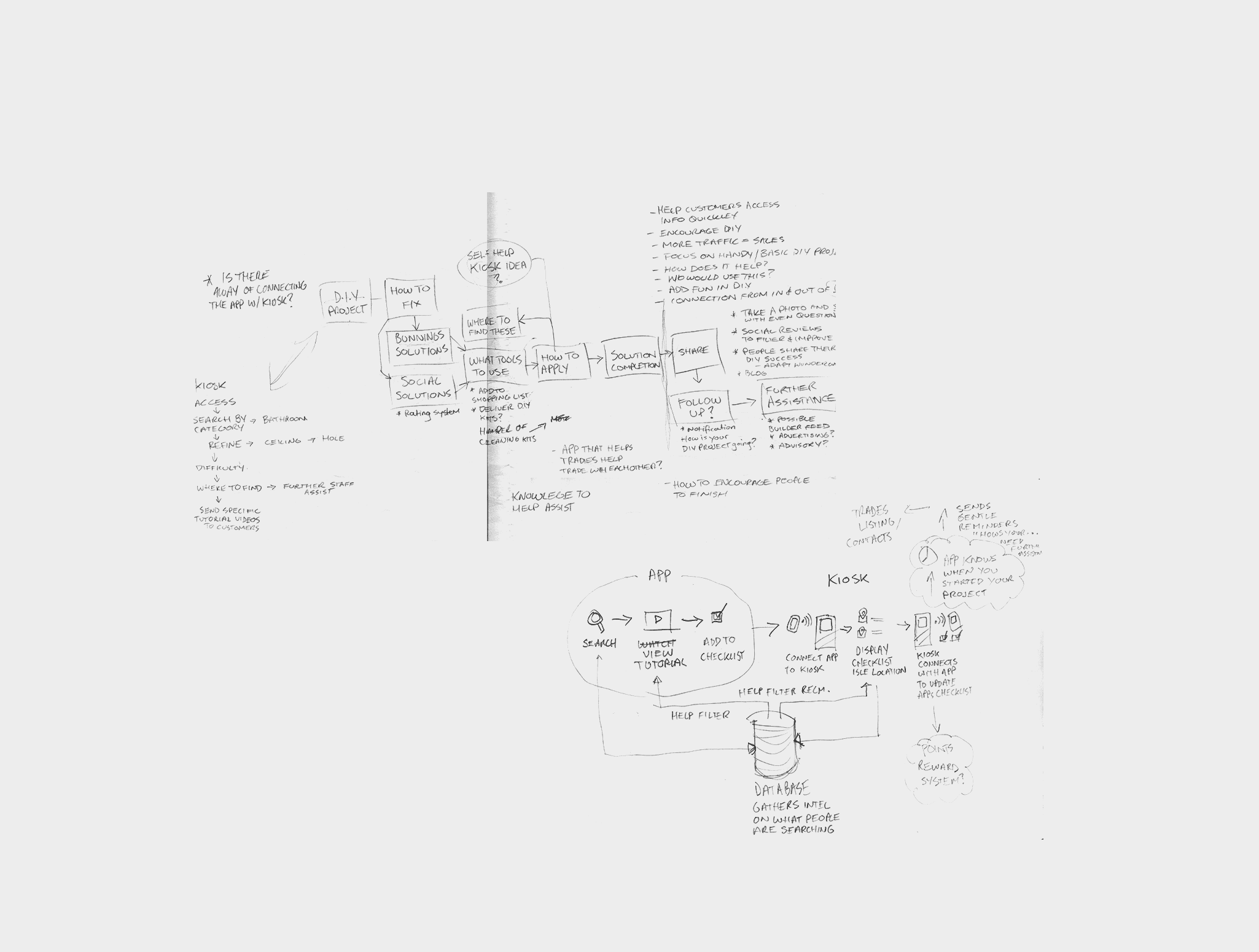
Initial Idea
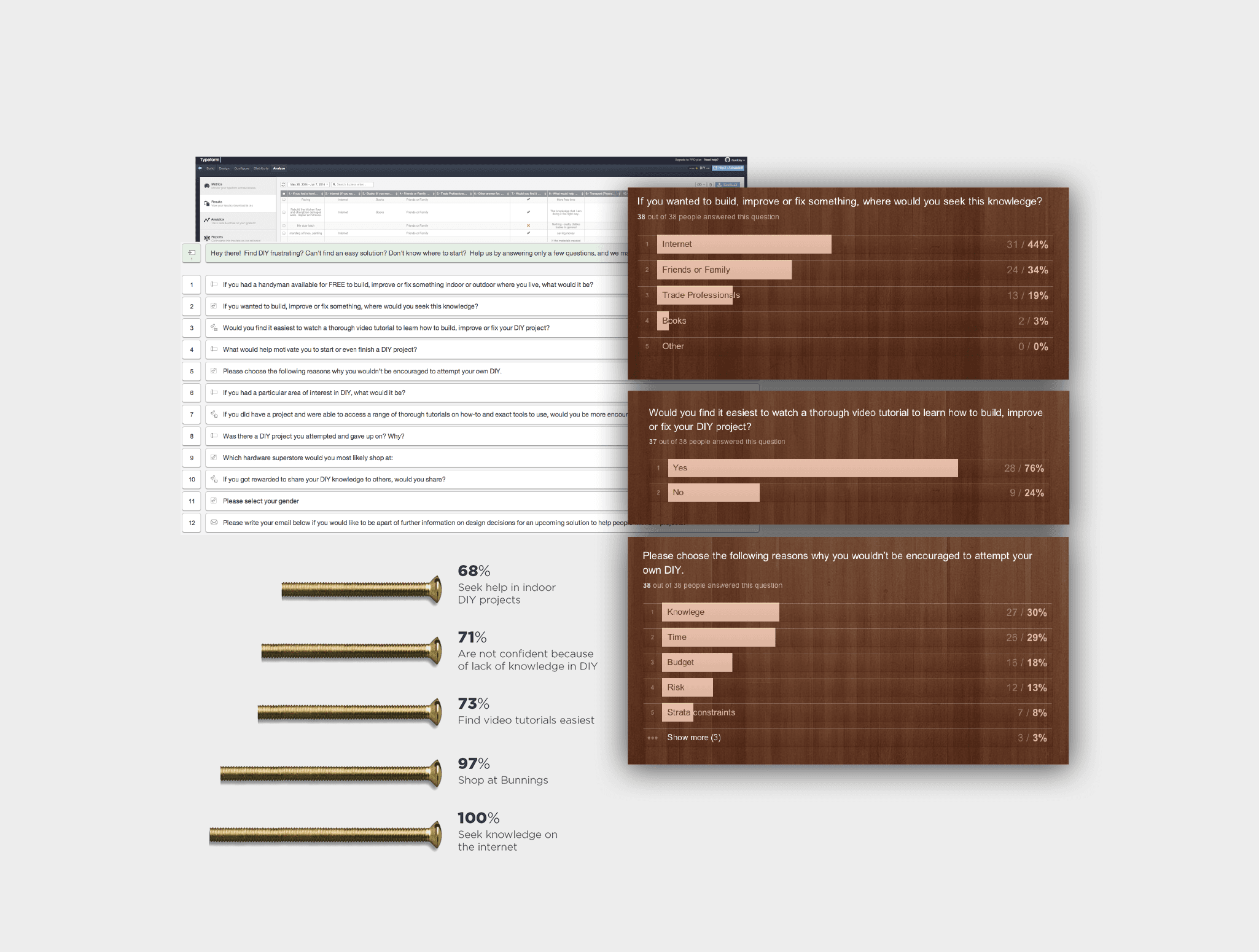
Research Survey Results
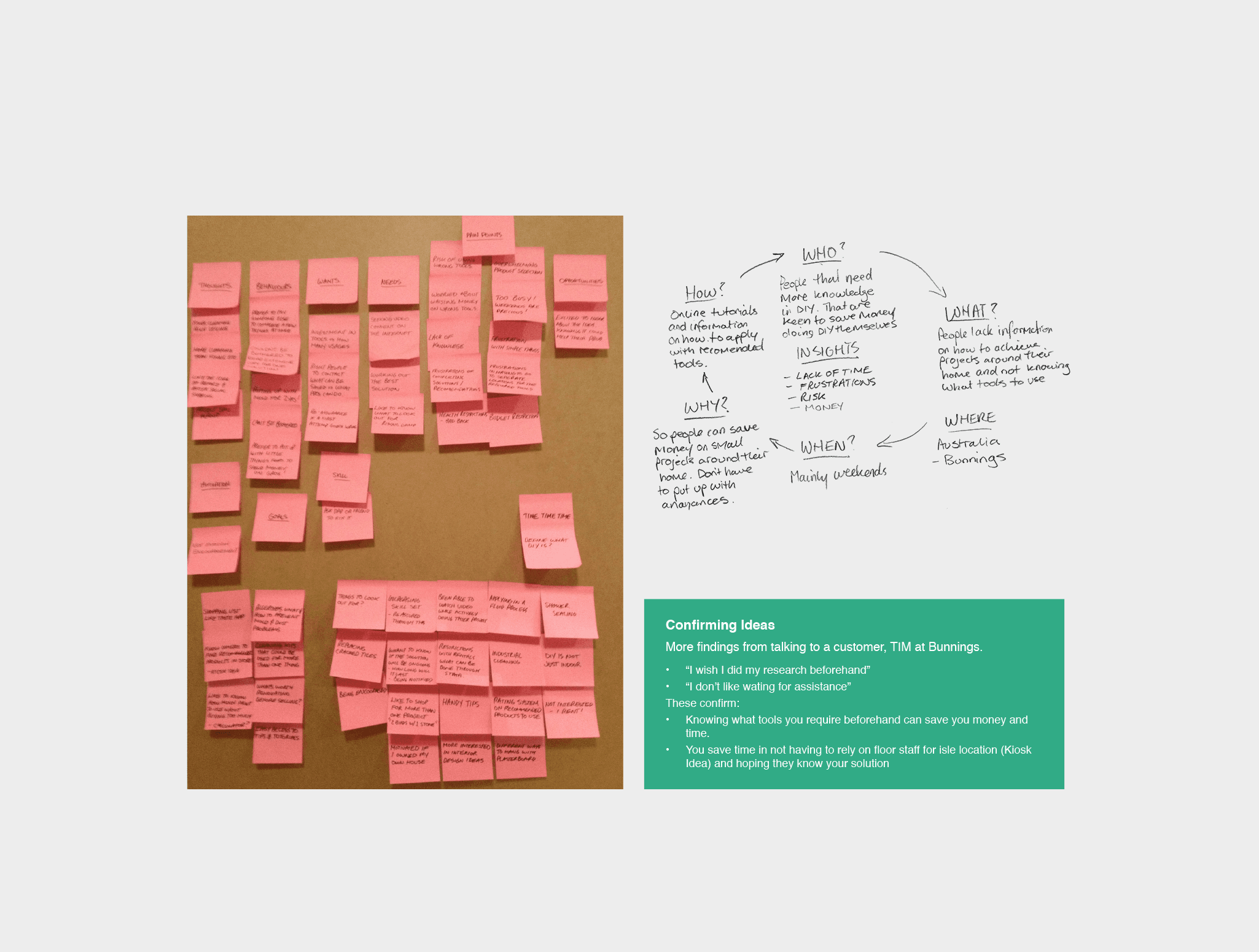
Research
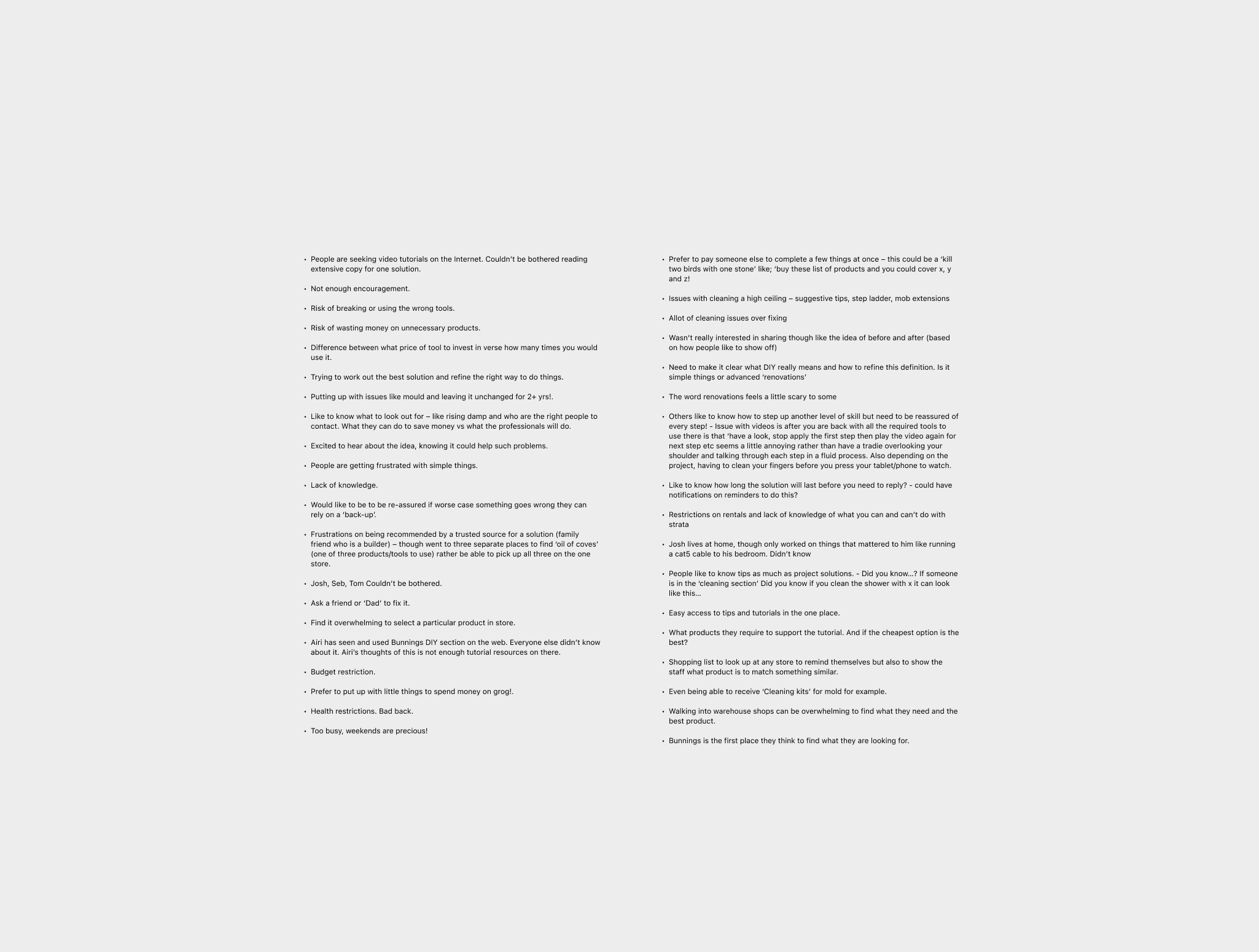
Interview Notes
Initial Idea
Research Survey Results
Research
Interview Notes
Initial Idea
Research Survey Results
Research
Interview Notes
Initial Idea
Research Survey Results
Research
Interview Notes
Initial Idea
Research Survey Results
Research
Interview Notes
Initial Idea
Research Survey Results
Research
Interview Notes
Initial Idea
Research Survey Results
Research
Interview Notes
Initial Idea
Research Survey Results
Research
Interview Notes
Initial Idea
Research Survey Results
Research
Interview Notes
Initial Idea
Research Survey Results
Research
Interview Notes
Initial Idea
Research Survey Results
Research
Interview Notes
Initial Idea
Research Survey Results
Research
Interview Notes
Project Overview
Approach
I started by looking into common pain points in DIY projects and shopping at hardware stores. Through user interviews and analysing existing DIY apps and e-commerce sites, I found several key insights:
Overwhelm in DIY choices: Many users felt uncertain about where to start or which tools they needed for their projects.
Difficulty navigating stores: Customers often found it hard to locate items, even if they knew exactly what they were looking for.
Engagement and motivation: Users wanted an app that could help them track their progress and give them a sense of accomplishment as they completed tasks.
With these insights, I set out to design an app that would address all of these concerns in a seamless, engaging way.
Approach
I started by looking into common pain points in DIY projects and shopping at hardware stores. Through user interviews and analysing existing DIY apps and e-commerce sites, I found several key insights:
Overwhelm in DIY choices: Many users felt uncertain about where to start or which tools they needed for their projects.
Difficulty navigating stores: Customers often found it hard to locate items, even if they knew exactly what they were looking for.
Engagement and motivation: Users wanted an app that could help them track their progress and give them a sense of accomplishment as they completed tasks.
With these insights, I set out to design an app that would address all of these concerns in a seamless, engaging way.
Approach
I started by looking into common pain points in DIY projects and shopping at hardware stores. Through user interviews and analysing existing DIY apps and e-commerce sites, I found several key insights:
Overwhelm in DIY choices: Many users felt uncertain about where to start or which tools they needed for their projects.
Difficulty navigating stores: Customers often found it hard to locate items, even if they knew exactly what they were looking for.
Engagement and motivation: Users wanted an app that could help them track their progress and give them a sense of accomplishment as they completed tasks.
With these insights, I set out to design an app that would address all of these concerns in a seamless, engaging way.
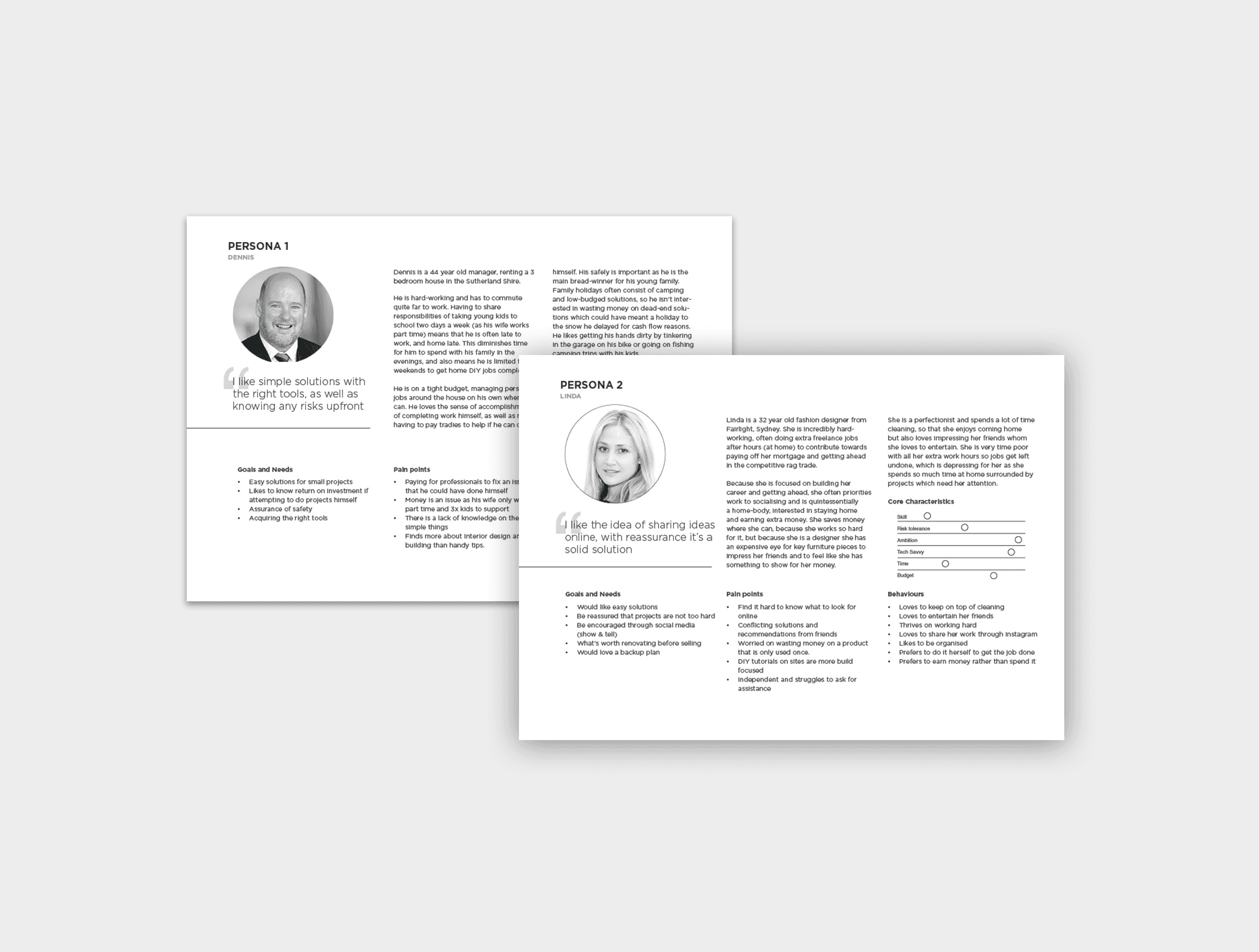
Personas
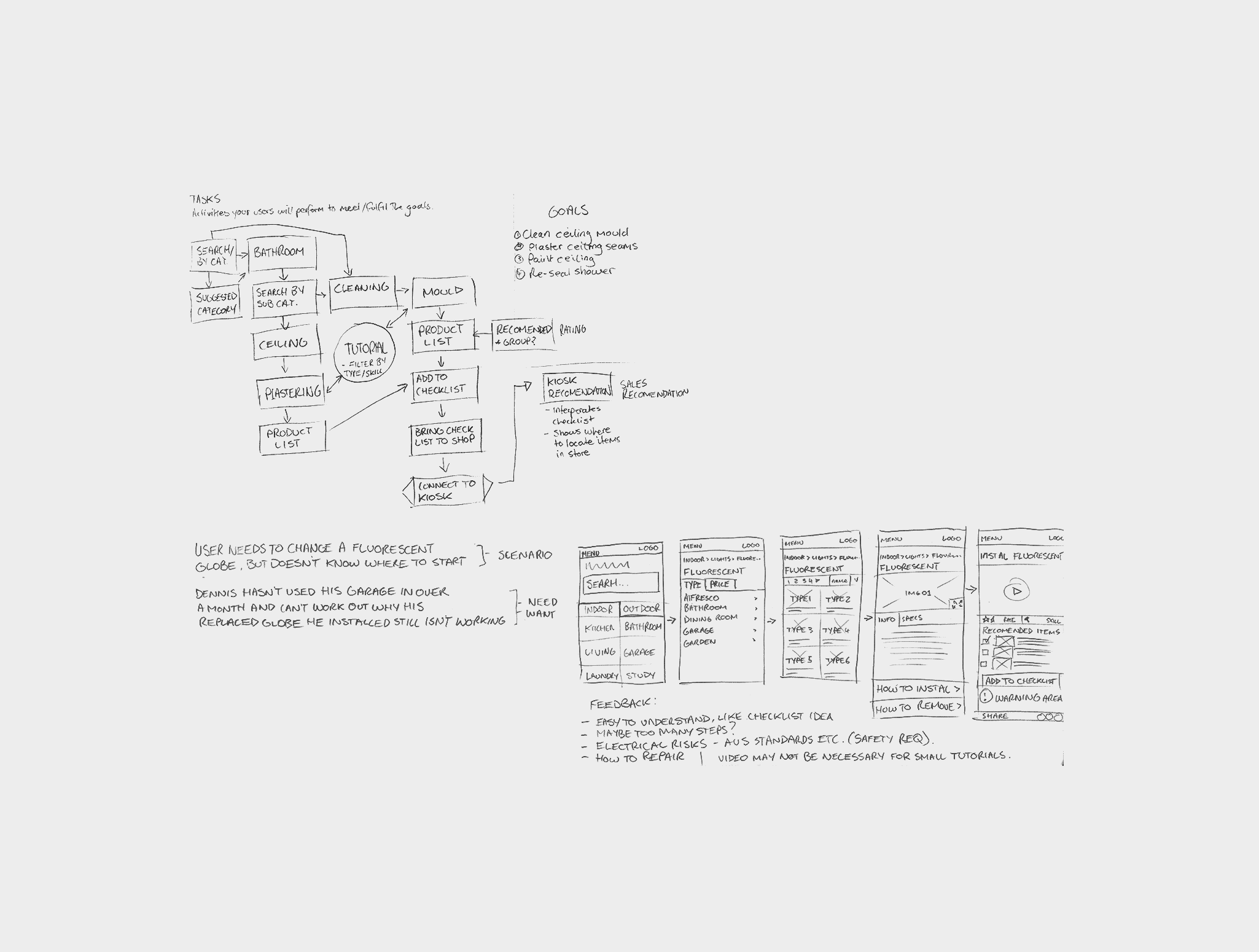
Tasks Exploration
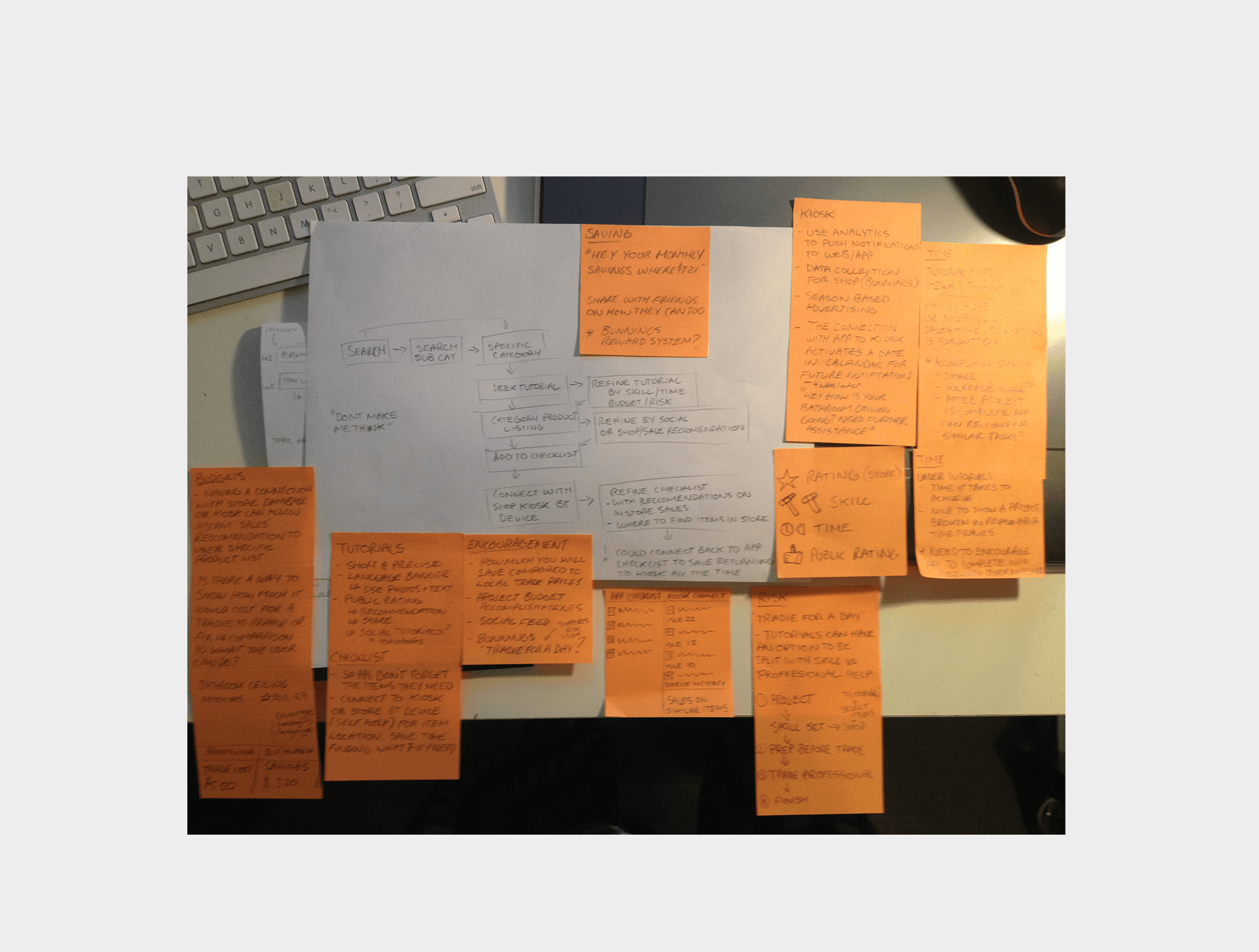
Refining Tasks
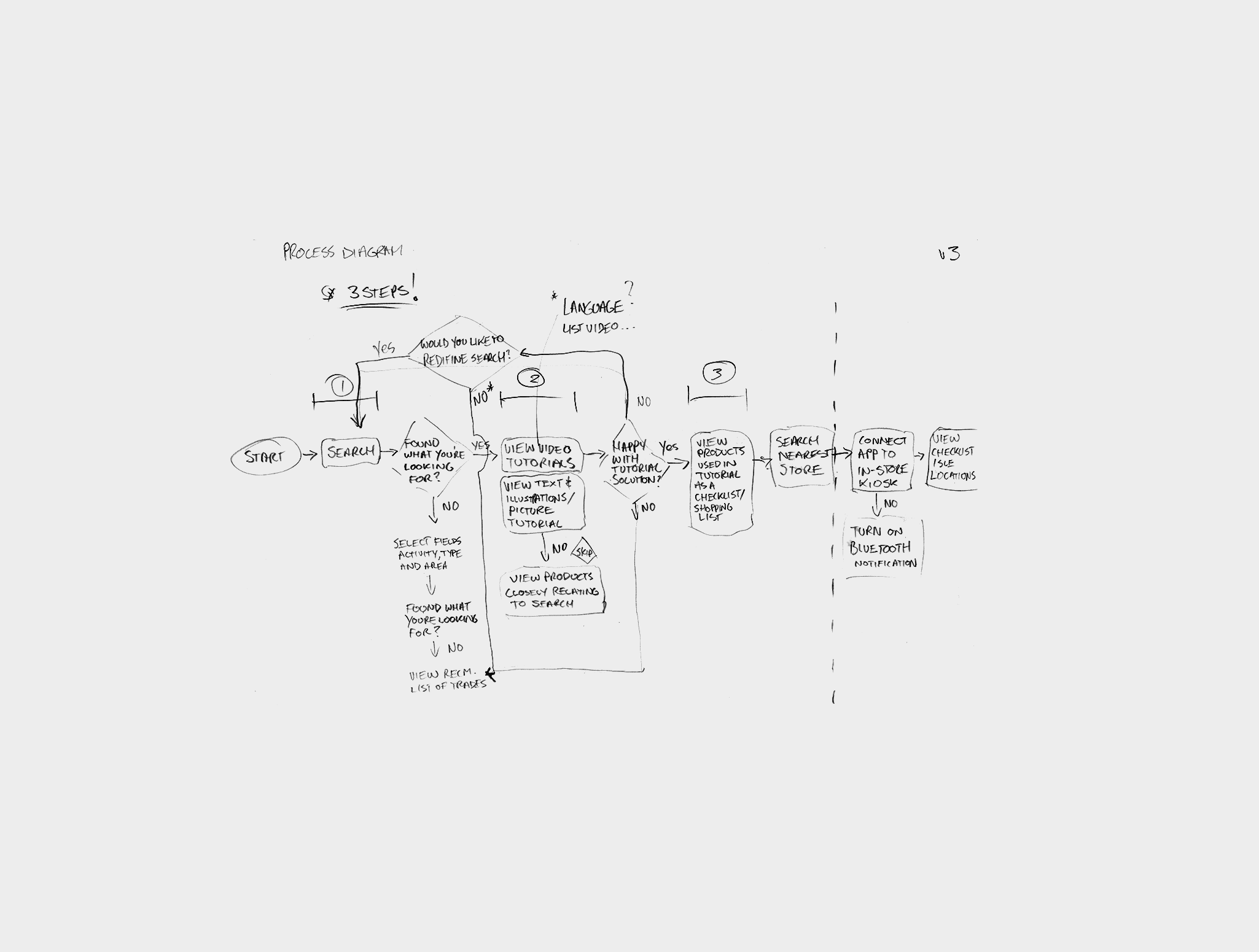
Process Exploration
Personas
Tasks Exploration
Refining Tasks
Process Exploration
Personas
Tasks Exploration
Refining Tasks
Process Exploration
Personas
Tasks Exploration
Refining Tasks
Process Exploration
Personas
Tasks Exploration
Refining Tasks
Process Exploration
Personas
Tasks Exploration
Refining Tasks
Process Exploration
Personas
Tasks Exploration
Refining Tasks
Process Exploration
Personas
Tasks Exploration
Refining Tasks
Process Exploration
Personas
Tasks Exploration
Refining Tasks
Process Exploration
Personas
Tasks Exploration
Refining Tasks
Process Exploration
Personas
Tasks Exploration
Refining Tasks
Process Exploration
Personas
Tasks Exploration
Refining Tasks
Process Exploration
Project Overview
Defining The Big Picture
Personalised DIY Project Library:
The app’s core feature was a project library, offering a wide range of DIY projects for different skill levels (from basic repairs to advanced home improvements). Each project was broken down into easy-to-follow steps and included video tutorials, material lists, and tool suggestions. The app used clear imagery and simple language to make projects approachable, even for beginners.
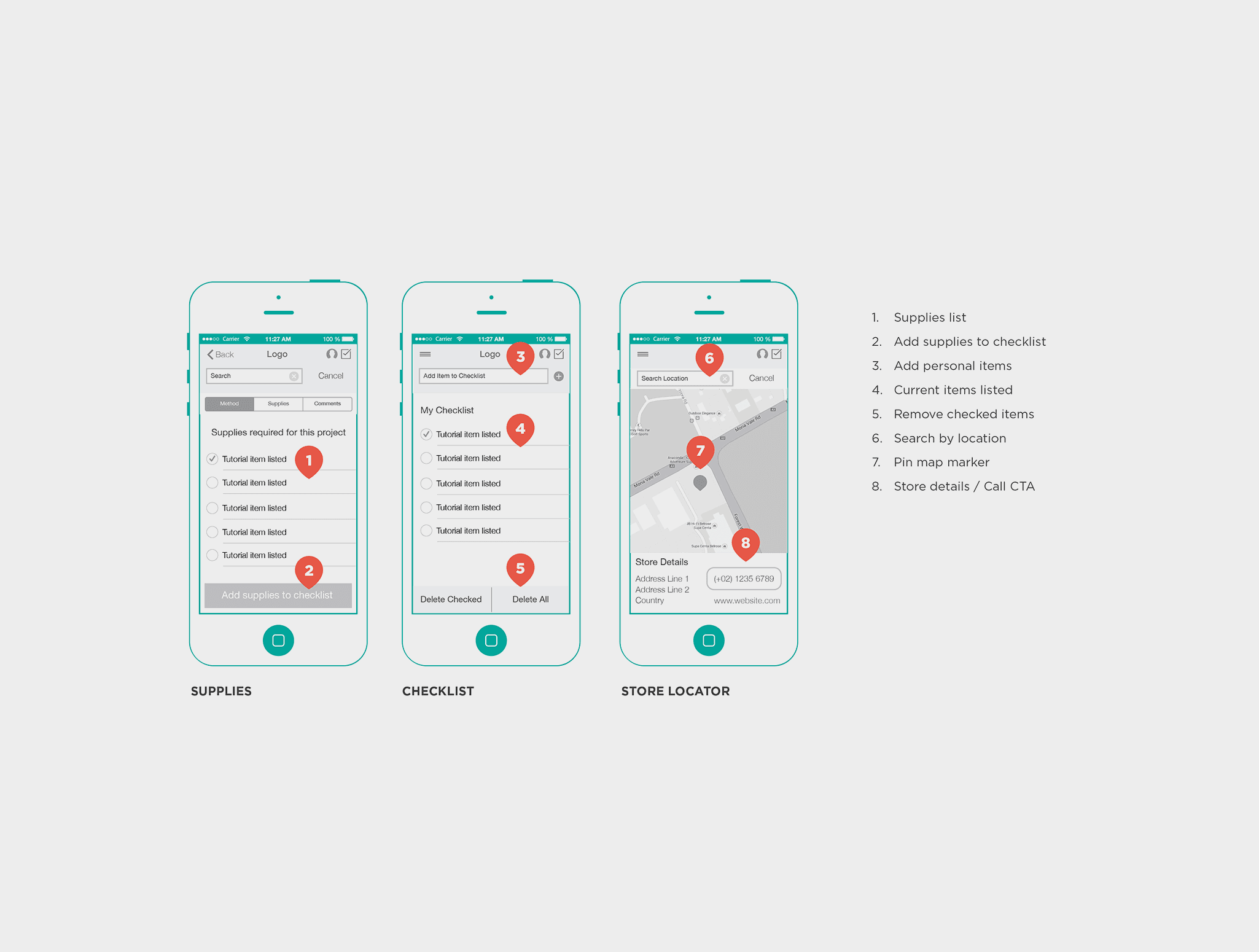
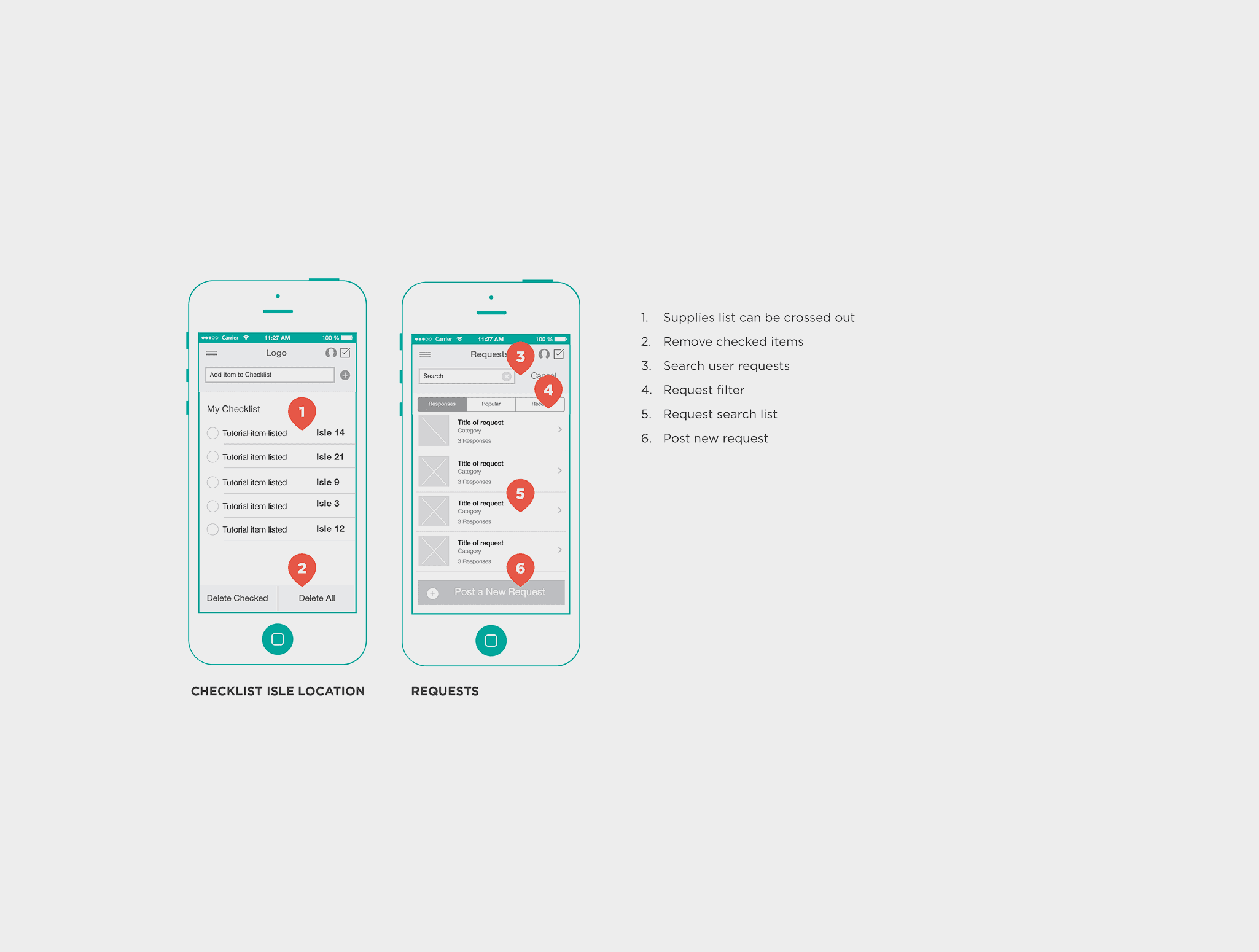
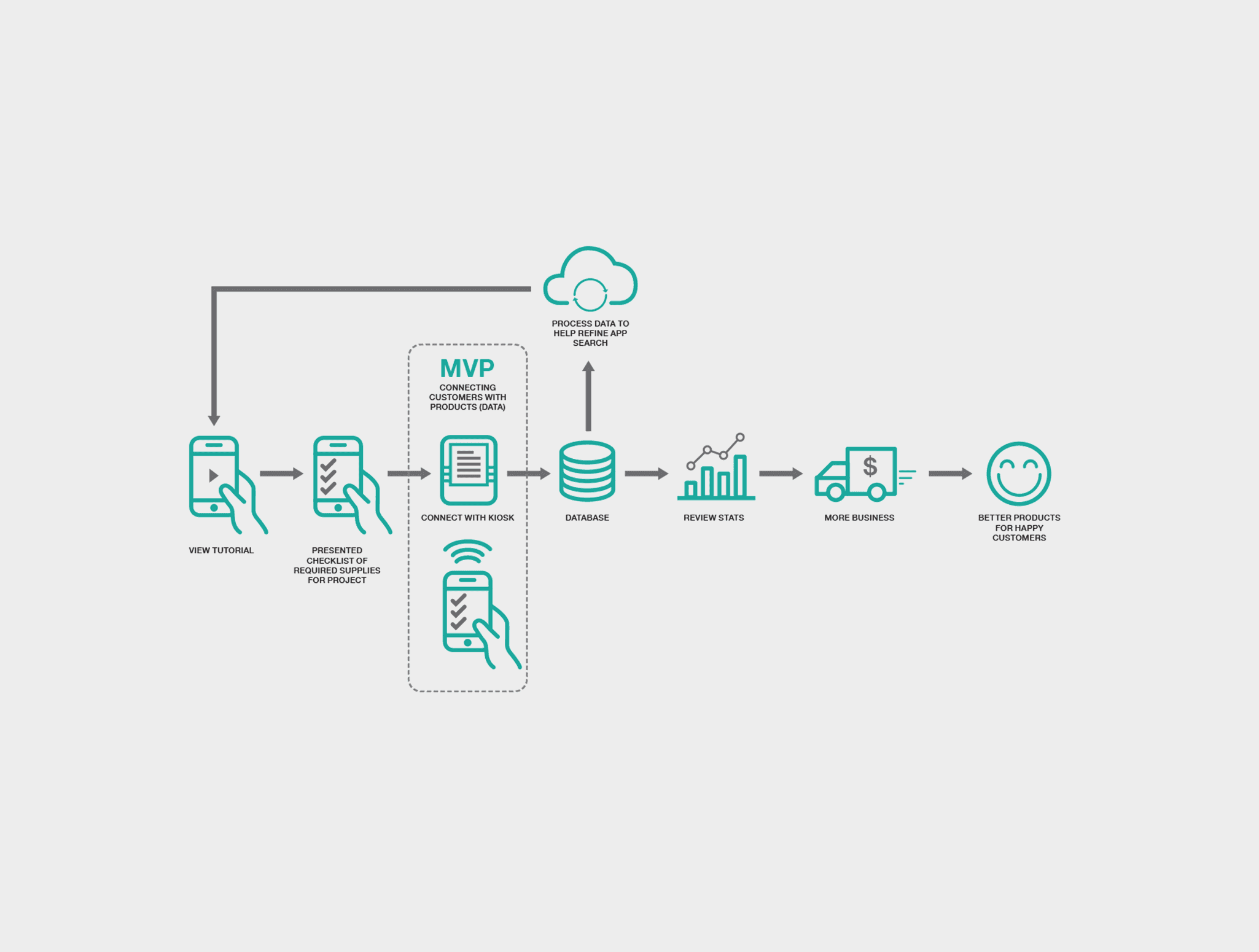
Smart Shopping Lists: Once users selected a project, the app generated a customised shopping list with the materials and tools needed. The list could then be synced to the hardware company’s product database, showing the availability and location of items at the user’s local store. This way, users could easily find out where their items were located in-store and even check if they were in stock.
Product Locator: I added a product locator feature, allowing users to get detailed information on where items were in-store, including aisle numbers and shelf locations. This would reduce the frustration of searching the store for specific items, improving the overall shopping experience.
Progress Tracking & Rewards: To keep users engaged, the app included progress tracking features where users could log their completed tasks, track their milestones, and earn badges or rewards as they finished projects. The app would also send reminders and motivational messages, encouraging users to continue their DIY journey.
Social Sharing & Community: I also wanted users to feel like they were part of a community. The app included a social sharing feature where users could share their completed projects, tips, and experiences with friends or other app users. This would foster a sense of achievement and provide a platform for social interaction around DIY topics.
Defining The Big Picture
Personalised DIY Project Library:
The app’s core feature was a project library, offering a wide range of DIY projects for different skill levels (from basic repairs to advanced home improvements). Each project was broken down into easy-to-follow steps and included video tutorials, material lists, and tool suggestions. The app used clear imagery and simple language to make projects approachable, even for beginners.
Smart Shopping Lists: Once users selected a project, the app generated a customised shopping list with the materials and tools needed. The list could then be synced to the hardware company’s product database, showing the availability and location of items at the user’s local store. This way, users could easily find out where their items were located in-store and even check if they were in stock.
Product Locator: I added a product locator feature, allowing users to get detailed information on where items were in-store, including aisle numbers and shelf locations. This would reduce the frustration of searching the store for specific items, improving the overall shopping experience.
Progress Tracking & Rewards: To keep users engaged, the app included progress tracking features where users could log their completed tasks, track their milestones, and earn badges or rewards as they finished projects. The app would also send reminders and motivational messages, encouraging users to continue their DIY journey.
Social Sharing & Community: I also wanted users to feel like they were part of a community. The app included a social sharing feature where users could share their completed projects, tips, and experiences with friends or other app users. This would foster a sense of achievement and provide a platform for social interaction around DIY topics.
Defining The Big Picture
Personalised DIY Project Library:
The app’s core feature was a project library, offering a wide range of DIY projects for different skill levels (from basic repairs to advanced home improvements). Each project was broken down into easy-to-follow steps and included video tutorials, material lists, and tool suggestions. The app used clear imagery and simple language to make projects approachable, even for beginners.
Smart Shopping Lists: Once users selected a project, the app generated a customised shopping list with the materials and tools needed. The list could then be synced to the hardware company’s product database, showing the availability and location of items at the user’s local store. This way, users could easily find out where their items were located in-store and even check if they were in stock.
Product Locator: I added a product locator feature, allowing users to get detailed information on where items were in-store, including aisle numbers and shelf locations. This would reduce the frustration of searching the store for specific items, improving the overall shopping experience.
Progress Tracking & Rewards: To keep users engaged, the app included progress tracking features where users could log their completed tasks, track their milestones, and earn badges or rewards as they finished projects. The app would also send reminders and motivational messages, encouraging users to continue their DIY journey.
Social Sharing & Community: I also wanted users to feel like they were part of a community. The app included a social sharing feature where users could share their completed projects, tips, and experiences with friends or other app users. This would foster a sense of achievement and provide a platform for social interaction around DIY topics.
Project Overview
Exploring with Wireframes
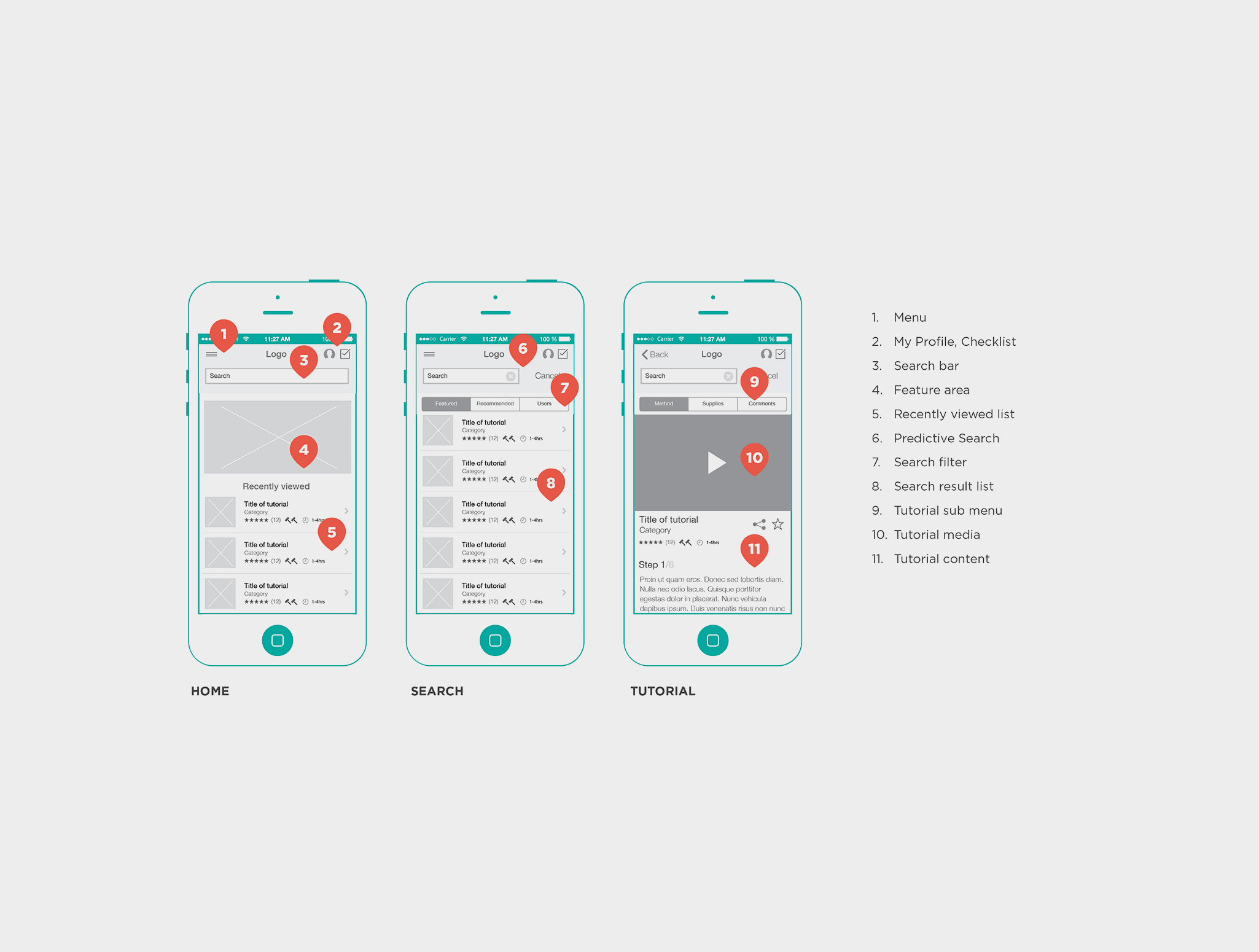
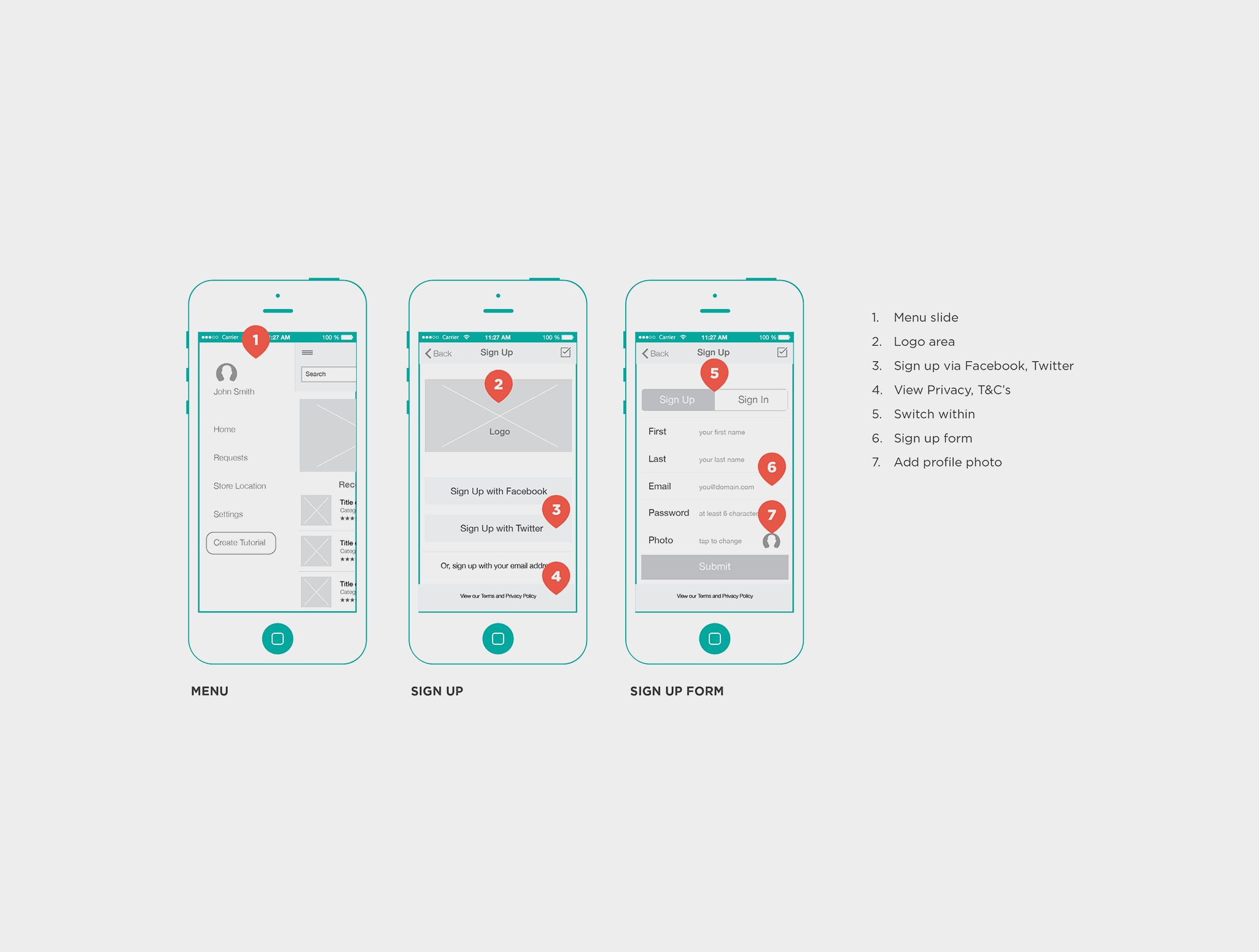
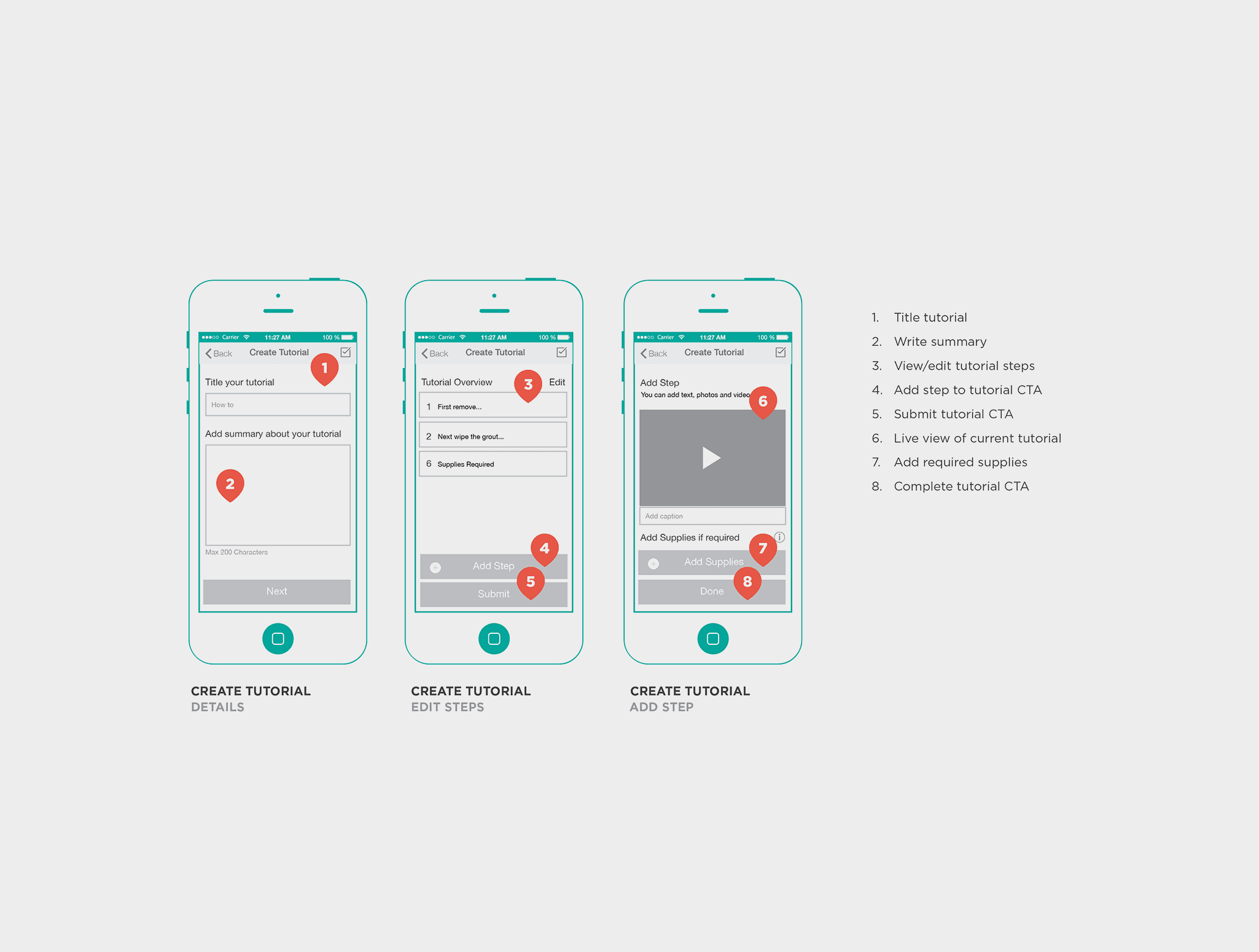
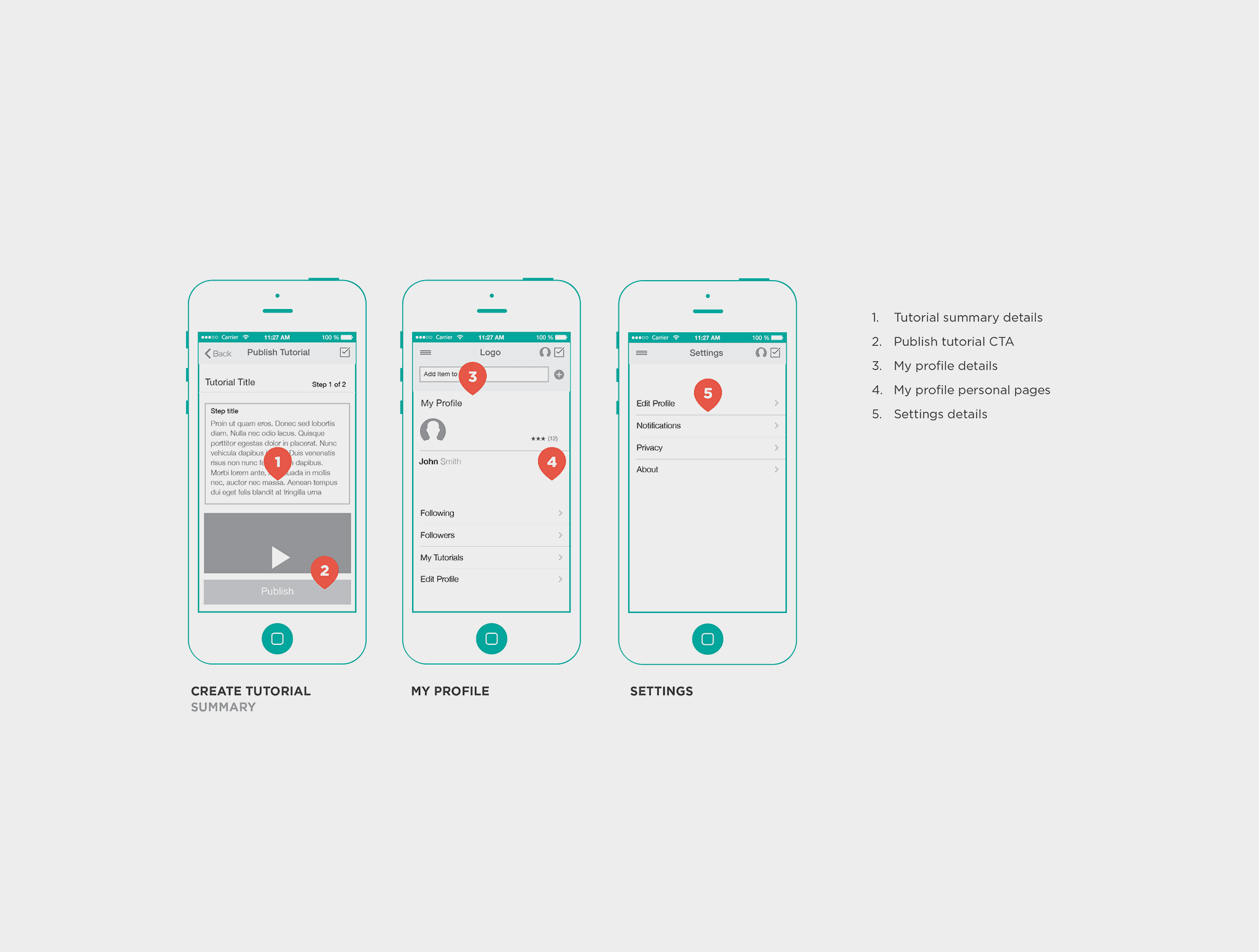
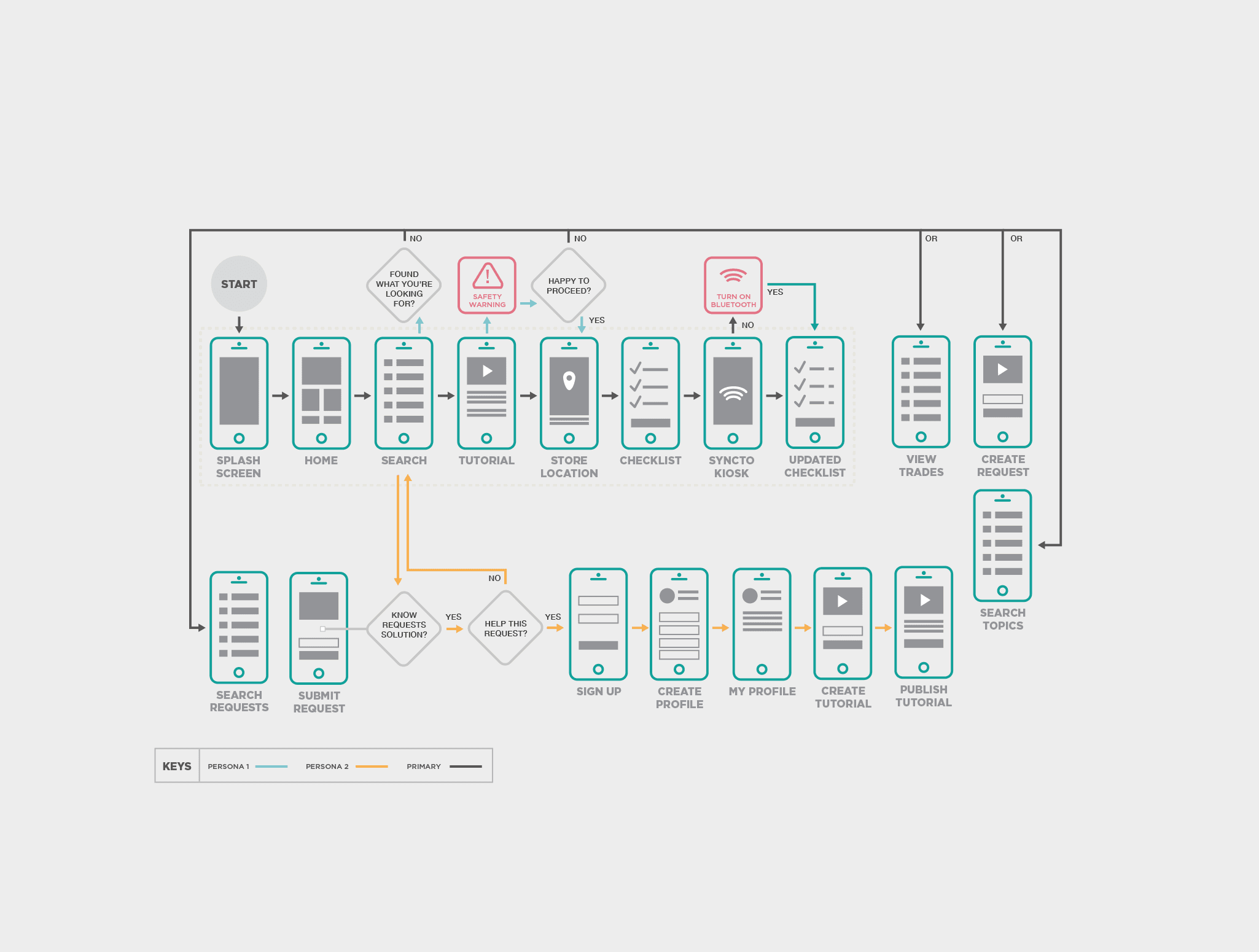
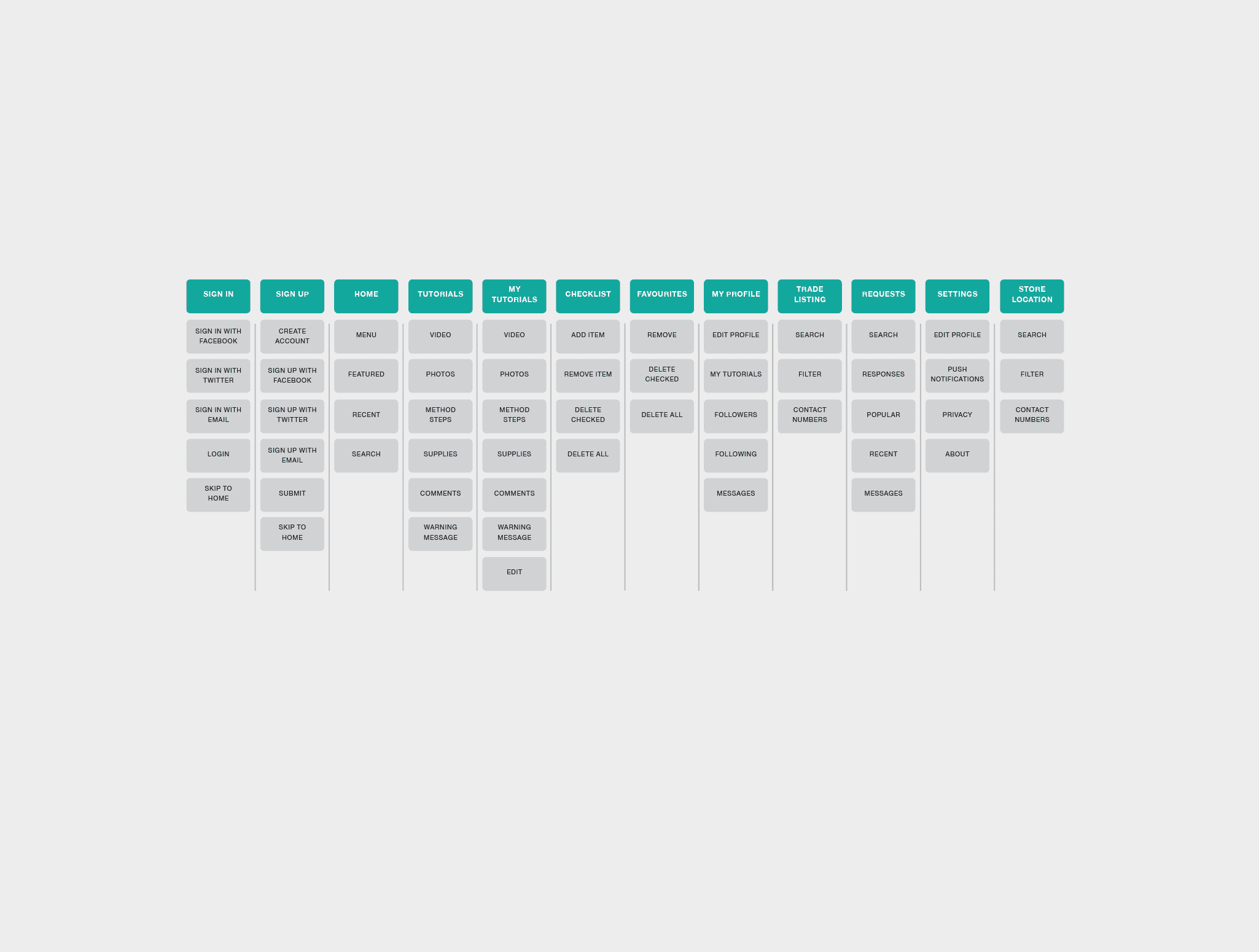
I began by sketching out the main features of the app, focusing on the user flow from selecting a project to syncing shopping lists with the store. After wireframing, I created interactive prototypes using tools like Sketch to test and refine the experience.
Usability Testing: I conducted a basic usability test with my previous group of DIY survey enthusiasts to identify pain points and gather feedback. This helped me iterate on key features like the shopping list syncing and the project navigation to make the app as user-friendly as possible.
Next Steps
Visual Design: For the final visual design, I will use a modern, clean aesthetic that would appeal to a wide range of users. The colour scheme will be inspired by the leading hardware store branding, using large images, simple icons, and clear typography to make the app accessible for all ages.
Exploring with Wireframes
I began by sketching out the main features of the app, focusing on the user flow from selecting a project to syncing shopping lists with the store. After wireframing, I created interactive prototypes using tools like Sketch to test and refine the experience.
Usability Testing: I conducted a basic usability test with my previous group of DIY survey enthusiasts to identify pain points and gather feedback. This helped me iterate on key features like the shopping list syncing and the project navigation to make the app as user-friendly as possible.
Next Steps
Visual Design: For the final visual design, I will use a modern, clean aesthetic that would appeal to a wide range of users. The colour scheme will be inspired by the leading hardware store branding, using large images, simple icons, and clear typography to make the app accessible for all ages.
Exploring with Wireframes
I began by sketching out the main features of the app, focusing on the user flow from selecting a project to syncing shopping lists with the store. After wireframing, I created interactive prototypes using tools like Sketch to test and refine the experience.
Usability Testing: I conducted a basic usability test with my previous group of DIY survey enthusiasts to identify pain points and gather feedback. This helped me iterate on key features like the shopping list syncing and the project navigation to make the app as user-friendly as possible.
Next Steps
Visual Design: For the final visual design, I will use a modern, clean aesthetic that would appeal to a wide range of users. The colour scheme will be inspired by the leading hardware store branding, using large images, simple icons, and clear typography to make the app accessible for all ages.